
Model materials
A model track draws an entity again through its own renderer, with every vertex going through Kinesis’s model
material. The renderer doesn’t need to know about Kinesis. Armour, held items and render layers all come along, and so
do models from other mods, GeckoLib included.
The mask
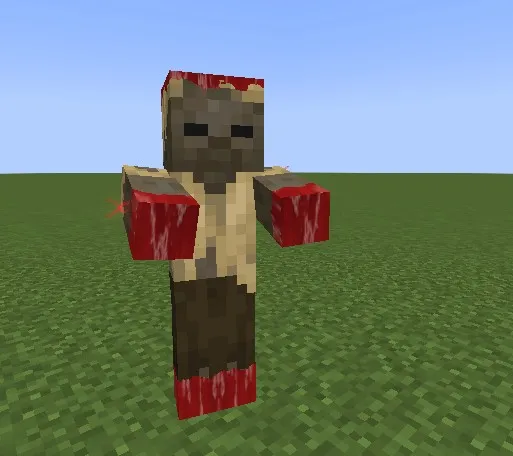
Section titled “The mask”The mask gives every pixel of the model a distance, and a front travels through those distances.
mode |
Distance |
|---|---|
point |
From origin |
plane |
Along axis, from origin |
bones |
Along the skeleton, from the centre of the root bone outward |
noise |
Pure noise, for an even dissolve |
none |
No mask |
progress is how far the front has travelled, in blocks. Animate it with a curve. noise roughens the edge.
By default, everything the front has passed is visible. invert: true flips that, so the model disappears as the
front passes, which turns growth into disintegration.
Layers
Section titled “Layers”Behind the front, layers stack in order. Each lasts width blocks behind the front; the last lasts forever.
"layers": [ { "width": 0.16, "texture": "kinesis:material/blood", "tiling": 5, "glow": 0.35 }, { "width": 0.28, "texture": "kinesis:material/bone", "tiling": 4 }, { "width": 0.42, "texture": "kinesis:material/muscle", "tiling": 3 }, { "texture": "entity" }]entity is the model’s own texture. Any other texture tiles across the model and keeps the model’s transparency, so
cut-out parts stay cut out. edge adds a glowing rim right at the front.
Hiding the original
Section titled “Hiding the original”hide_original: true stops the entity’s normal rendering while the track runs. It is how an effect starts from
nothing (regeneration) or replaces the entity (petrification).
The copy is lit the way the game lights entities, light map and damage flash included, and the hidden entity keeps
its shadow: the round one on the ground, and under a shaderpack its place in the shadow map. Set shadow: false
when the copy moves away from where the entity stands, such as halves falling apart; shatter always leaves it out.
Like the game, a copy of the camera’s own entity is not drawn while the camera is inside it in first person, so effects on the player do not fill their screen. Copies left behind, such as afterimages, still show.
Snapshots and afterimages
Section titled “Snapshots and afterimages”snapshot: true freezes the model at the moment the track starts. The copy outlives the entity, so it works for
death dissolves and statues.
afterimages leaves frozen copies behind as the entity moves, each fading out:
"afterimages": { "count": 7, "interval": 0.05, "life": 0.35 }Bending the surface
Section titled “Bending the surface”deform changes the shape of the model on the graphics card, so it costs a few numbers per frame whatever the
model. Every field is animatable:
"deform": { "bulge_at": { "bone": "right_arm:center" }, "bulge": "0.09 + 0.07 * sin(age * 5)", "bulge_radius": 0.32, "swell": 0.01, "ripple": 0.01, "ripple_size": 0.25, "ripple_speed": 1.5}swellpushes the whole surface out, likeinflate.bulgeswells the surface withinbulge_radiusofbulge_at: a flexing muscle, a growth, something moving under the skin.rippleruns waves over the surface.meltgoes from 0 to 1: the model sinks to the ground and spreads into a puddle (spreadsets how wide), unevenly, so some parts hang on and drip. It works on the live, animating model.
Block models only have vertices at their corners, so while bulge, ripple or melt is in use the copy’s faces
are cut into small cells as they are captured, letting the surface bend between the corners. swell alone pushes
each box out evenly and needs no extra cells. kinesis:flex and kinesis:melt show these.
Cutting a model in two
Section titled “Cutting a model in two”slice cuts the model along a plane and draws each half on its own:
"slice": { "origin": [0, 1, 0], "normal": [1, 0.25, 0], "gap": { "keys": [[0, 0], [0.08, 0], [1, 0.35, "out_quad"]] }, "tilt": { "keys": [[0, 0], [0.1, 0], [0.55, 88, "in_quad"]] }, "cap_color": [1.2, 0.08, 0.1, 1]}origin and normal are in the entity’s frame, measured from its feet. gap moves the halves apart, tilt tips
each one over around the foot of the cut, and drop slides the half on the normal side down. Where the cut opens
the model, the inside is filled with cap_color, darker deeper in; values above 1 glow. Use snapshot: true to cut
a frozen pose, or leave it off and the halves keep animating. See kinesis:slice.
Breaking a model into chunks
Section titled “Breaking a model into chunks”shatter freezes the model and breaks it into up to 64 chunks that burst out, tumble, fall and come to rest on the
ground:
"shatter": { "pieces": 40, "origin": [0, 1.1, 0.2], "force": 2.4, "lift": 2.2, "spin": 420, "gravity": 16, "inner_color": [0.32, 0.06, 0.06, 1]}The model is cut once, when the track starts: faces are split into squares size blocks wide, so chunks have ragged
edges rather than following whole faces, and the squares are grouped into pieces chunks of mixed sizes. After that
the flight of every chunk is worked out on the graphics card from its index and the time, so a frame costs the same
with 4 chunks or 64. time defaults to age, the seconds since the track started; hold it at a value to freeze the
burst mid-air, or run it backwards to put the model together again. inner_color fills the broken faces. See
kinesis:shatter.
Ghosts and holograms
Section titled “Ghosts and holograms”offset, scale and inflate move, resize and puff out the copy. With an additive material and a fresnel fade you
get a hologram:
{ "type": "model", "offset": [1.3, 0, 0], "inflate": 0.01, "layers": [{ "texture": "kinesis:material/hologram", "tiling": 6 }], "material": { "blend": "add", "fresnel": { "power": 1.6, "strength": 1.8, "color": [0.6, 1.6, 2.2, 1], "fade": true } }}How regeneration is built
Section titled “How regeneration is built”kinesis:regen uses only general features:
- A
modeltrack withhide_originalhides the evaporated mob from the start. Itsbonesmask stays at 0 for the first part of the effect. - A
particlestrack gathers dark remnants inward with an attractor and curl noise. - A single cell appears: a
meshsphere atbody:center, pulsing through an expression. - Cells divide: a
particlestrack whose particles start thekinesis:regen_spliteffect when they die. - Veins grow along the skeleton: a
tendrilstrack withpath: bones. - Organs pulse:
meshspheres with fresnel, scaled bypulse(time * 9.5, 10)for a heartbeat. - The body forms: the mask’s
progresssweeps out from the torso through blood, bone, muscle and skin. - Steam rises from the surface and the original returns.
Open assets/kinesis/kinesis/effects/regen.json in the Kinesis jar to read it in full.